








EditPrime | Mobile Video Editing SDK for Android & iOS Apps
Mobile Video Editing SDK
iScripts EditPrime
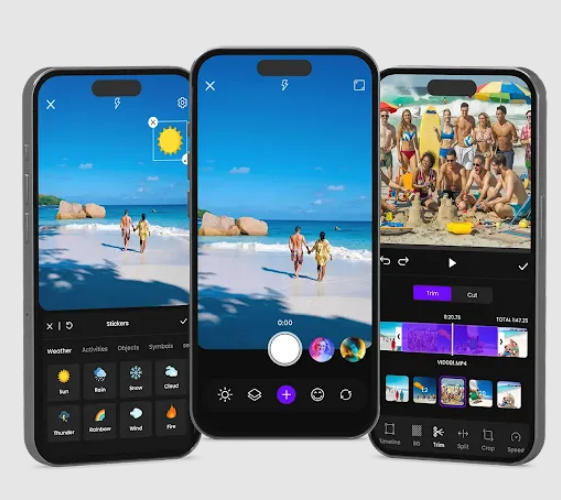
iScripts EditPrime simplifies building mobile video editing apps for Android and iOS. It provides everything you need—trim, merge, filters, transitions, audio mixing, overlays, text tools, export options, and more. With EditPrime’s all-in-one SDK, developers can quickly launch a full-featured editing experience without handling complex media processing, rendering pipelines, or UI design from scratch.
Description

 |
Mobile Video Editing SDK
iScripts EditPrime
iScripts EditPrime simplifies building mobile video editing apps for Android and iOS. It provides everything you need—trim, merge, filters, transitions, audio mixing, overlays, text tools, export options, and more. With EditPrime’s all-in-one SDK, developers can quickly launch a full-featured editing experience without handling complex media processing, rendering pipelines, or UI design from scratch.
iScripts EditPrime Models And Use Cases
iScripts EditPrime: SDK Modules
-
- Import & Media Library
Users can import videos, images, or audio from the device, gallery, or custom sources. The module includes file browsing, drag-and-drop selection, and automatic media handling.

-
- Timeline Editor
The timeline provides multi-track video editing with trimming, splitting, rearranging, zoom-in/out, clip locking, and precise adjustment controls. Developers can customize the timeline theme and behaviour.
-
- Effects & Enhancements
Users can apply filters, transitions, stickers, animations, text overlays, color correction, blur effects, and LUTs. The engine supports real-time previews and GPU-accelerated rendering.
-
- Audio Tools
Add background music, mute original audio, adjust levels, add fade-in/out effects, or record voiceovers directly from the app.
-
- Export Engine
Export videos in multiple formats and resolutions (480p–4K). Configure presets, bitrate, FPS, and encoding modes based on app requirements.
-
- Settings & Customization
Developers can customize UI themes, enable/disable features, add watermarks, configure export defaults, and integrate custom plugins. The SDK also supports multilingual interfaces.
The iScripts EditPrime Advantages:
-
- Real-time Filters
Record videos with filters applied live. Supports advanced effects such as vignette, blur, pixelation, and artistic styles during capture.
-
- Slow motion capture
Capture videos at high frame rates (up to 120 FPS) for smooth slow-motion playback.
-
- Trim/Cut
Precisely remove unwanted sections from videos by trimming or cutting selected time ranges.
-
- Crop function
Crop videos using predefined aspect ratios or freeform selection. Supports rotation and horizontal/vertical flipping.
-
- Transitions
Add seamless transitions between clips, including flip, fade, swipe left/right, and similar effects.
-
- Custom filters
Create personalized video filters by adjusting visual settings such as color, brightness, contrast, and style. Users can also import LUT (Look-Up Table) files to apply professional color grading instantly. All custom filters are previewed live while recording and applied consistently in the final exported video.
-
- Face/body tracking for overlays
To attach sticker/text to a face and update overlay positions over time.
-
- Background removal
To blur/replace background or create “subject cutout” overlays.
-
- Watermark
App watermark is automatically added during recording and remains visible in the final exported video. Watermark position and style are fixed.
-
- Undo Redo
Allows users to easily reverse or reapply recent actions such as trims, crops, filter changes, transitions, and transformations. Provides a smooth, non-destructive editing experience, enabling experimentation without the risk of losing progress.
Mobile App Details
-
- End-to-End Video Creation in One SDK
Record, edit, enhance, and export high-quality videos with real-time filters, overlays, multi-track editing, and 4K support without relying on multiple tools.
-
- Fast, Flexible, and Scalable Integration
Accelerate development with a customizable, device-aware SDK that adapts across hardware, supports product scalability, and delivers consistent performance.
-
- Powered by iScripts’ Proven Product Framework
Built on iScripts’ expertise in ready-to-deploy, fully customizable software with source code ownership, enabling faster launches, long-term scalability, and complete business control.
iScripts EditPrime Includes:
- Front and rear camera recording support
- Live camera switching during video recording
- Tap-to-focus and continuous auto-focus
- Tap-to-expose with adjustable exposure bias
- Flash and torch control support
- Wide, ultra-wide, and telephoto lens support (iOS)
- Automatic device-based lens detection
- Real-time video filter application
- Six built-in filter presets
- Adjustable filter intensity control
- 30 FPS real-time filter preview
- Multi-resolution video recording up to 4K
- Multiple frame rate support up to 60 fps
- Automatic device capability fallback
- Built-in video stabilization
- Microphone audio recording with video
- Video import from device gallery
- Multi-track timeline video editing
- Clip splitting and precise timeline placement
- Real-time playback and frame-accurate preview
- Cross-fade transition support
- Text overlay creation and styling
- Sticker overlay with transform controls
- Image overlay support with timeline scheduling
- Animated GIF overlay support
- Per-clip filter application in editing
- Customizable SDK UI and theming
- Configurable export resolution and quality
- MP4 and MOV export format support
- Save exported videos directly to device gallery

You must be logged in to post a review.


Reviews
There are no reviews yet.