





Megatranscript – AI Text To Speech & Voice Cloning Tool | Lifetime Access
58,84 $
Description

 |
Robotic voiceovers, messy transcripts, and time-consuming edits? Not anymore! Presenting –
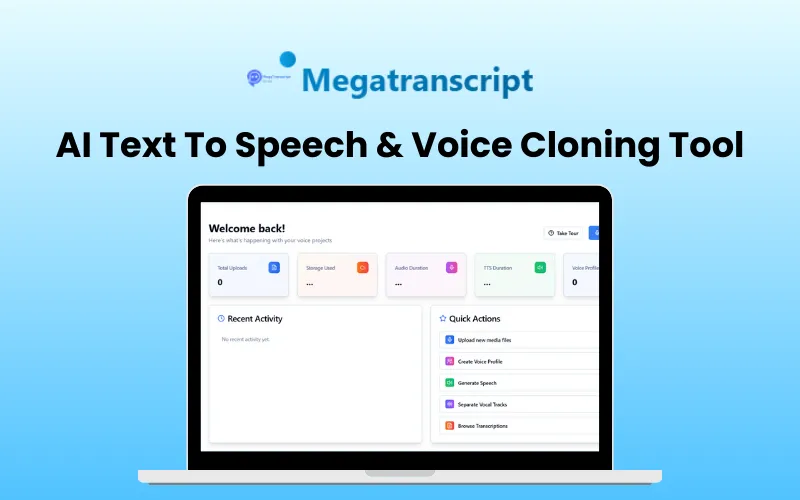
Megatranscript – AI Text To Speech Tool
Megatranscript is an advanced AI text-to-speech and voice cloning tool for –
Voice cloning
Transcription
Speech generation
Audio editing and more
Megatranscript helps you –
Create lifelike custom AI voices,
Achieve lightning-fast transcription with top-notch accuracy, and
Manage all your audio projects effortlessly.
It supports over 98 languages, ensuring that your content sounds authentic to your audience, regardless of their language.
Additionally, it provides features such as secure cloud storage, professional subtitle generation, and enterprise-grade security.
Whether you are a content creator, an educator, a business person, or a musician, MegaTranscript empowers you to enhance audio experience with AI.
Introduction To Megatranscript – AI TTS & Voice Cloning Tool:
Features Of Megatranscript:
AI Voice Cloning:
Allows you to create custom AI voice profiles using advanced neural networks from your audio samples.
Provides advanced AI algorithms that capture the unique characteristics, tone, and nuances of any voice with remarkable precision.
Smart AI-Transcription:
Provides AI-powered transcription with speaker identification and 99.9% accuracy.
AI Text To Speech:
Generates natural-sounding speeches with custom voices in 98+ languages.
AI Audio Source Separation:
Easily separates vocals from instrumentals with advanced AI audio source separation.
Cloud Library:
Provides a secure cloud storage for all your audio projects with instant sync.
Preview Of Megatranscript – AI Voice Cloning Tool
Cloud Library
Speaker Diarization
AI Text To Speech
AI Transcription
AI Voice Cloning
Megatranscript Dashboard
AI Voice Track Separation
AI Video Subtitles
AI Video Cutter
AI Video Dubbing
Jobs and Tasks
Subtitle Generation
Megatranscript Reviews:
I’ve used a bunch of transcription tools over the years, but Megatranscript is on another level. Uploading is fast, the AI picks up crazy accuracy, and I can export in every format I need. What used to take me 2–3 hours now takes 15 minutes. Worth every penny.
Jamie L
I use Megatranscript to transcribe all my lectures, and it’s been a game-changer. The accuracy is about 95%.
Priya R.
I was skeptical about AI transcripts for legal work, but Megatranscript proved me wrong. It’s fast, secure, and surprisingly accurate with legal jargon.
Marcus D.
Q&A:
How do I upload audio files for transcription?
You can upload audio files by clicking the ‘Upload Audio’ button on the Transcriptions page. Megatranscript supports MP3, WAV, M4A, and other common audio formats.
What languages are supported for voice cloning?
Currently, Megatranscript only supports English for voice cloning. More languages are coming soon!
How accurate are the transcriptions?
Megatranscript’s AI-powered transcription typically achieves 95-98% accuracy for clear audio. Accuracy may vary based on audio quality, background noise, and speaker clarity.
Can I export subtitles in different formats?
Yes, Megatranscript supports SRT, VTT, ASS, and other popular subtitle formats. You can choose your preferred format when exporting.
How long does voice cloning take?
Voice cloning typically takes 2-5 minutes for processing, depending on the length and quality of your voice sample.
What audio quality is recommended for the best results?
For optimal transcription and voice cloning results, it recommends audio files with at least a 16kHz sample rate, minimal background noise, and clear speech.
How is my data protected?
Megatrancript uses enterprise-grade encryption for all data in transit and at rest. Your audio files and personal data are never shared with third parties.
What’s the maximum file size for uploads?
Premium account holders can upload files up to 1GB.
How do I create custom voice profiles?
Navigate to Voice Cloning, click ‘Create New Profile’, and upload a clear 30-60 second audio sample of the voice you want to clone.
Deal Terms:
How to download/activate this product?
After completing your purchase, you will receive an instructions document. Follow the instructions in this document to redeem the coupon code and get access to this product.
What is the validity of the license key/coupon code? (Within how many days must the coupon code be redeemed?)
The coupon code must be redeemed within 30 days of the purchase date.
Is a Lifetime Subscription available for this product?
Yes, a lifetime subscription* is available with this deal for Megatranscript.
*LIFETIME MEANS LIFETIME OF THE PRODUCT.
We try to get great products with longevity for our customers, but products do get acquired, or sometimes the products go bankrupt. Many of these products are from startup companies, giving us a great deal for our customers. But in case of an unfortunate situation where the product does not last long, there is not much DealFuel can do about it.
Are updates available for this product?
Yes, free lifetime updates are available for this product
Is support available for this product?
Yes, free lifetime support is available for this product.
For support, contact hey@arucy.com.
Is this deal for new users only?
No, this deal is available for both new and existing users of this Megatranscript.
How many users can use the license key/coupon code?
One coupon code can be used for one user/account.
Are the coupon codes stackable?
Yes, the coupon codes are stackable.
Can this product be accessed on all devices?
Yes, Megatranscript is accessible on all devices, provided that they have a good internet connection.

You must be logged in to post a review.
Related products
-
Workaforce – AI Video Script Generator | Annual Access
84,42 $ Buy product -
ReelPostly – AI Branding Tool | Lifetime Access
40,93 $ Buy product -
Sale!
1000 Business Videos Bundle | Extended Commercial License
Original price was: 1.705,41 $.16,20 $Current price is: 16,20 $. Buy product -
Hypnotype – Faceless Video Generator | Annual Access
24,73 $ Buy product

Reviews
There are no reviews yet.