






PDF Reader Pro – Powerful, & Fast PDF Manager | Lifetime Access
27,28 €
Description

 |
Tired of wrestling with multiple tools to manage your PDFs? Manage everything with just one PDF editor, introducing –
PDF Reader Pro – All-In-One PDF Manager
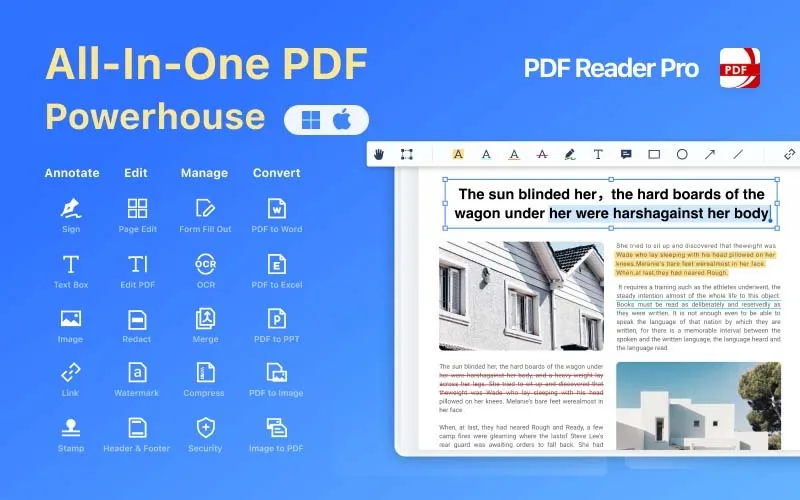
PDF Reader Pro is the go-to PDF Manager for Mac, iPad & iPhone, Android and Windows. It is packed with the latest tools to view, annotate, sign, convert, scan, and protect your PDF files.
Loved and trusted by 90 Million users, PDF Reader Pro has been recognized as “High Performer” in Customer Satisfaction in spring 2022 by G2 for File Reader Software.
This PDF manager has also been proudly included in GetApp’s 2022 “Category Leaders” report for PDF Software.
Introduction To PDF Reader Pro For Windows And Mac
https://youtu.be/5_9ksFsinXEhttps://youtu.be/ALzbpvxm8EU
Message From The Founder:
Dear users!
I am the Founder of PDF Reader Pro Team. Hope you all are fantastic and doing well in 2024!
Good news sharing to you in 2024— now affordable PDF Reader Pro for Teams is available (Volume Licensing), which are intended for business entity use. By using the Admin Console, our team users can assign and manage Licenses easily in the office.
Click here to learn more: https://www.pdfreaderpro.com/vpp-purchase-program
Features Of PDF Reader Pro – PDF Editor Lifetime License
Multiple Reading Modes
It provides you multiple reading modes including multi-tab viewing, full-screen, page-fit, horizontal or vertical orientation.
PDF Presentation
It allows you to present your PDF as PPT in slideshow mode, you can create, edit and search outlines to navigate easily.
PDF Annotation Tools
It allows you to annotate and markup PDF with highlight, underline, strikethrough, freehand, text box, anchored note, shape and etc.
It allows you to add comments continuously
It allows you create multiple signatures for any situations with trackpad, keyboard or images.
It dynamic stamps to customize your PDF
It allows you to add hyperlinks
PDF Editor
It allows you to edit PDF files including adding, deleting, moving, or modifying text. Change font attributes (size and style)
Redact PDF
It allows you to remove or black out private and sensitive information permanently with the redaction feature
Create Fillable PDF Forms
It allows you to create & edit forms. Create fillable PDF Forms from interactive field objects, such as buttons, check boxes and list boxes. Support to align and distribute form objects
Fill out any PDF forms. Work with static PDF forms created in Adobe Acrobat.
PDF Converter Pro
It allows you to export from PDF to Microsoft Word (.docx), PowerPoint (.pptx), Excel (.xlsx), RTF, Text, HTML, Image, CSV, and more Offline (Permanent License)
Convert to PDF from images imported from Scanner and TXT files
Extract images in PDF documents with one click
PDF Page Editor
It allows you to merge and split documents, extract desired pages to create a new PDF or insert another file into an existing file.
PDF Editing Tools
It allows you to add watermarks to keep your documents safe and professional
It allows you to add unique prefix or suffix which can be a set number, case number, firm name or date
It allows you to change background color of the PDFs
It allows you to flatten PDF to make content static
It provides booklet to put your page side by side, resorted fo booklet printing
It provides you poster, which divides large PDF pages into smaller pages
PDF OCR
It allows you to convert scanned PDF forms or pictures into editable and searchable PDFs or TXT files.
Secure Files
It allows you to keep your sensitive documents password protected.
PDF Compressor
It allows you compress your PDF files to make your document much lighter.
AI-Powered Features
AI Summarize:
Quickly extracts core insights and creates multi-language summaries from any long text.
AI Rewrite
Automatically transforms text into grammatically flawless, semantically rich, and ready-to-use content.
AI Proofread
Identifies and corrects grammar, spelling, and punctuation errors with smart suggestions.
AI Translation:
Instantly translates entire documents and files into multiple languages.
Preview Of PDF Reader Pro – PDF Manager Software
Read & Annotate (Mac)
Read & Annotate (Windows)
Edit PDF (Mac)
Edit PDF (Windows)
OCR (Mac)
OCR (Windows)
Fill Form (Mac)
Fill Form (Windows)
PDF Reader Pro Reviews
The program does everything I want in making various notes on the PDF file with highlights, text notes, etc. I grade my students’ papers with this app. It’s much cleaner than simply scribbling on the paper. Now my students will actually read my feedback for them.
HendersonTeacher
It is intuitive and easy to use. Best application for merging, splitting, shrinking, manipulating, adding and taking away pages with ease. I don’t know how I would cope without it. Oh, the free version gets some or most of the simple jobs done.
CharlesDoctor
Sure, it’s not Adobe Acrobat Pro or PDFpenPro, but super easy and light and more convenient than adobe reader or anything. love it! It’s a very good and valued substitute for some applications. Well done!
JoyHR Manager
All the different PDF management tools-conversion, annotation,form filling etc-are as good as advertised and may be even better for how I had hoped. The presentation mode works especially well for me as PDF is the main working format in what I do.
Walter MentleProfessor
This software in any other way is very good, comments are very convenient. The app covers all the essential features I need in a pdf software. A must have app
Yohan LouisStudent
Feels good, simple and practical. I like the ease of use. What a handy app to have when you’re trying to open PDF files off the web or anywhere. Like it’s name it works like a pro.
BillCartoonist
Deal Terms –
How to download this product?
After completing your purchase you will receive an instructions document.
Follow the instructions in this document to redeem the PDF Reader Pro license key and activate the subscription.
What is the validity of the PDF Reader Pro license key/coupon code?
The PDF Reader Pro license key must be redeemed within 30 days from the date of purchase.
Is Lifetime Access available for this product?
Yes, Lifetime Access is available for this product.
Lifetime means the lifetime of the product.
We try to get great products with longevity for our customers, but products do get acquired, or sometimes the products go bankrupt. Many of these products are startup companies, giving us a great deal for our customers. But in case of an unfortunate situation where the product does not last long, there is not much DealFuel can do about it.
Are Lifetime Updates available for this product?
Yes, lifetime updates are available for this product.
Is this deal for new users only?
No, this deal is for all users of PDF Reader Pro.
How many users can use the license key/coupon code?
1 Coupon Code can be used for 1 pro plan.
Can this product be accessed on all devices?
This product can be accessed on Mac and Windows PCs only.
Is lifetime support available for this product?
Yes, FREE support is available for Lifetime.
For support contact – support@pdfreaderpro.com

You must be logged in to post a review.
Related products
-
Sale!
CleanTwin AI – Duplicate File Finder For Mac | Lifetime Access
Original price was: 17,05 €.8,52 €Current price is: 8,52 €. Buy product -
Sale!
tabMeister – Chrome Tab Manager | Lifetime Access
Original price was: 169,69 €.50,31 €Current price is: 50,31 €. Buy product -
Ashdeck – Focus Timer & Website Blocker | Lifetime Access
5,12 € Buy product -
EaseUS MobiMover – MDM Software (Win & Mac) | Lifetime Access
17,05 € Buy product

Reviews
There are no reviews yet.