







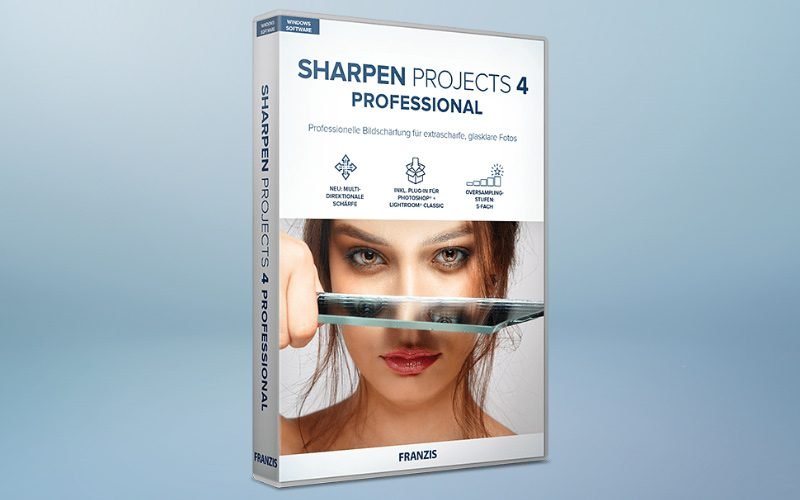
Sharpen Projects 4 Pro – Photo Sharpening Software | Lifetime Access
Original price was: 84,42 $.33,26 $Current price is: 33,26 $.
Description

 |
Whether you’re a seasoned photographer or a casual snapper, blurry images are always annoying. That’s why we bring you –
Sharpen Projects 4 Pro – Photo Sharpening Software.
Sharpen Projects 4 Pro is the go-to software for powerful and professional resharpening to rescue out-of-focus or blurry shots, remove sensor errors, and bring out fine details & sharpen blurry images.
Sharpen Projects offers 46 different and intelligent masking functions to protect image elements you do not want to sharpen.
This image sharpener analyses your images and creates useful suggestions, including all facets of modern photography.
Note: It requires image editing software that integrates third-party plug-ins
Introduction To Sharpen Projects 4 Pro – Photo Sharpening Software:
Features Sharpen Projects 4 Pro – Image Sharpener:
PSF Blur Function with Comparison Display
It allows you to simulate different types of blur and preview the results before applying them to your image.
33 Presets Collection
It provides a variety of pre-made blur presets that you can apply to your images with a single click.
RAW Development Module
It allows you to edit RAW image files and unprocessed images containing more data than JPEG or other file formats.
45 Sharpness Presets
It provides a variety of pre-made sharpness presets that you can apply to your images with a single click.
Multi-Directional Sharpness
This image sharpening tool allows you to sharpen your images in different directions, which can be useful for correcting blur caused by camera shake or lens aberrations.
Oversampling With 3 Levels
It upscales your images before sharpening them, which can help improve the final result’s quality.
4 Sharpness Quality Modes
It allows you to choose the quality of the sharpening output. The Balanced mode is a good all-around option, while the Pro, Pro+, and Pro Infinity modes are designed for more demanding applications.
Sharpen Projects 4 Pro Highlights – Photo Sharpening Software:
It offers full control over your images – no cloud application
It offers integration with Lightroom Classic and Photoshop
It offers full control over your images – no cloud application
Preview Of Sharpen Projects 4 Pro – Photo Sharpening Software:
Sharpen Projects UI
Deal Terms –
How to get access to Sharpen Projects 4 Pro after purchasing this deal?
After completing your purchase, you will receive an instructions document. Follow the instructions in this document to download the software, redeem the license key and activate your subscription.
What is the Validity of the activation license key/code? (Within how many days must the code be redeemed?)
The coupon code must be redeemed within 30 days from the date of purchase.
Is Lifetime Access available for this product?
Yes, Lifetime Access is available for this product.
Lifetime means – Lifetime of the product.
We do try to get great products with longevity for our customers, but products do get acquired, or sometimes they do go bankrupt. Many of these products are startup companies and hence they give us a great deal for our customers. But in case of an unfortunate situation, where the product does not last long, there is not much DealFuel can do about it. Are Updates available for this product?
Yes, updates are available for this product however they are paid. Is lifetime support available for this product?
Yes, FREE support is available for Lifetime. support – service@franzis.de Is this deal for new users only?
No, this deal is for both old and new users of Sharpen Projects 4 Pro How many users can use the license key/coupon code?
1 coupon code can be used by 1 user. Can this product be accessed on all devices?
This product can be accessed only on Windows. What are the system requirements for this product?
The system requirements for this product:Recommended- Windows 8/10 (64 Bit) – 8 GB RAM – Intel I7 (or comparable AMD processor) – DirectX compatible graphics card – Screen resolution 1920×1080 (or higher)Minimum- Windows 8/10 (64 Bit) – 4 GB RAM – Intel I3 (or comparable AMD processor) – DirectX compatible graphics card – Screen resolution 1600×900 (or higher)

You must be logged in to post a review.
Related products
-
Sale!
4K Tokkit – TikTok Video Downloader | Lifetime Access
Original price was: 51,16 $.25,58 $Current price is: 25,58 $. Buy product -
FlowVid – AI Video Generation Tool | Lifetime Access
50,31 $ Buy product -
Sale!
Nero – AI Video Upscaler Pro | Lifetime Access
Original price was: 166,28 $.118,53 $Current price is: 118,53 $. Buy product -
Workaforce – AI Video Script Generator | Annual Access
84,42 $ Buy product

Reviews
There are no reviews yet.